Choosing flight sim panels & instruments comes down to one practical question: do you want broad cockpit coverage, or a dedicated physical control cluster for a specific aircraft function? The Meza Ignition Panel USB takes the focused route, adding a keyed ignition and aircraft-style switches for Microsoft Flight Simulator 2020 and X-Plane. That makes it especially relevant to simmers who want tactile controls in a desktop setup or a larger home cockpit.
Quick verdict
The Meza Ignition Panel USB makes sense when physical ignition, master, lighting, fuel pump, pitot heat, and avionics controls are the priority. Its USB plug-and-play design keeps the connection straightforward, while the listed PC compatibility supports the intended computer-based simulator setup.
The trade-off is scope. The named controls center on an ignition and switch panel, so shoppers specifically looking for an MFD flight simulator display or a flight sim autopilot panel should see this as a focused cockpit addition rather than a control solution for every instrument function.
Meza Ignition Panel USB for MSFS2020 X-Plane Home Cockpit Flight Simulator
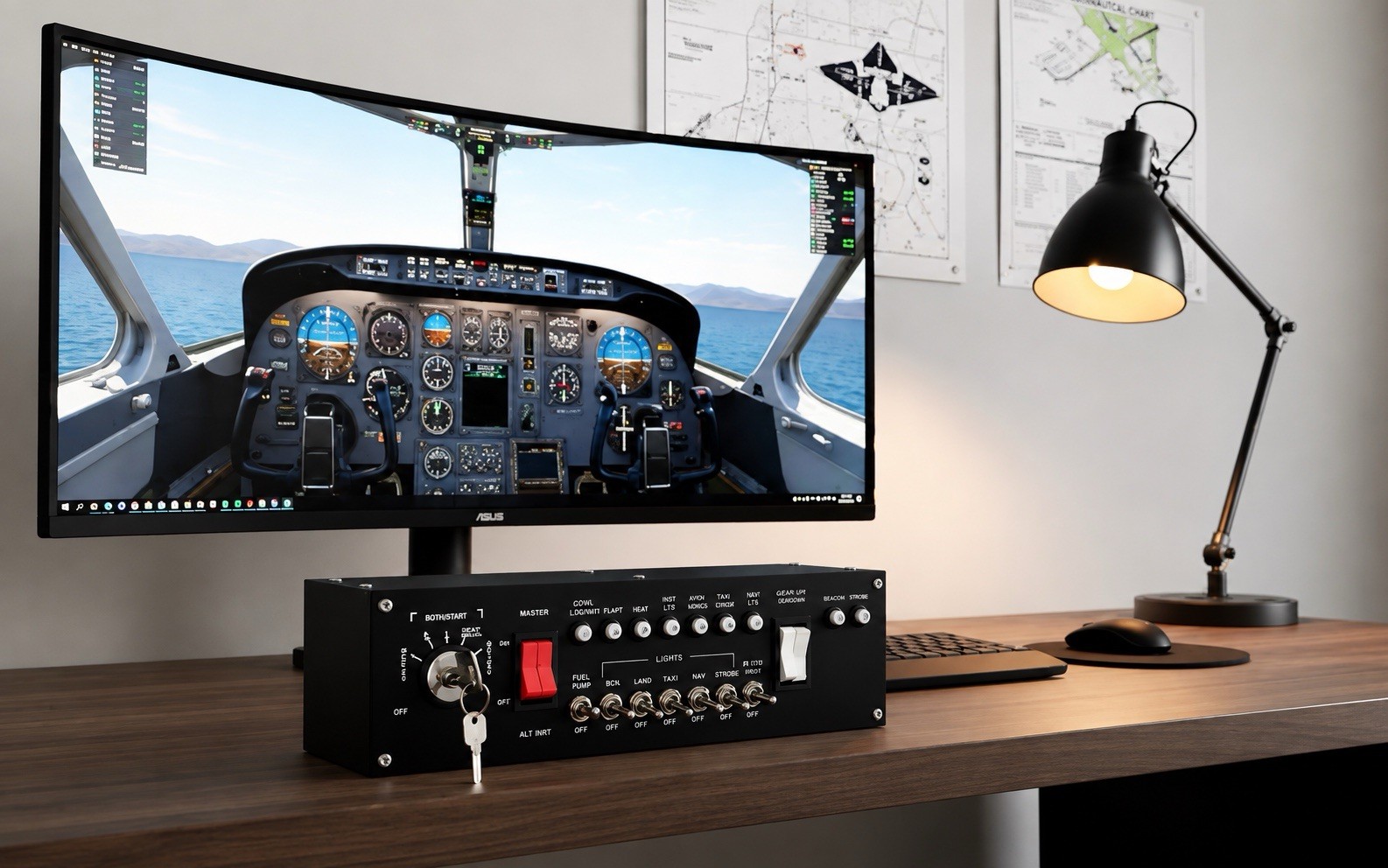
The strongest reason to choose the Meza panel is its combination of a realistic keyed ignition switch and aircraft-style toggle switches. The metal construction, black finish, included ignition key, and USB cable give the setup a defined physical control point instead of relying entirely on on-screen controls.
A concrete limitation is the listed price of USD 209.99 for a panel centered on ignition and switch functions. That can be a sensible allocation for a home cockpit build, but it is a more deliberate purchase than a basic software control accessory. The panel is also listed for a maximum of one player, matching its individual cockpit-control role.
Who it suits
- MSFS2020 or X-Plane users who want dedicated controls for ignition, master switches, lighting, fuel pump, pitot heat, or avionics functions.
- Desktop simulator owners who want to add a physical control surface without describing a full cockpit build as a requirement.
- Home cockpit builders who can use a black metal USB panel and a keyed ignition as part of a broader aircraft-style layout.
What stands out from the listed details
USB plug-and-play connectivity is the clearest convenience feature. The control layout also covers several cockpit tasks in one unit: ignition, master switching, lighting, fuel pump, pitot heat, and avionics. That combination gives the Meza panel a more specific role than a generic game controller, while the included key and cable make the package feel oriented toward immediate physical setup.
Meaningful trade-offs
The Meza panel's appeal depends on wanting switches you can operate by touch. If your priority is an MFD, autopilot controls, or a broader set of home cockpit instruments, the ignition-panel format may not align with that particular build goal. Its listed compatibility is also tied to PC use and specifically names MSFS2020 and X-Plane, so the fit is clearest for those simulator environments.
Bottom line
For a PC-based MSFS2020 or X-Plane cockpit, the Meza Ignition Panel USB is a focused way to add keyed ignition and aircraft-style switch controls. Choose it for the physical interaction and named cockpit functions; pass on it when your main need is an MFD or autopilot-focused panel instead.
