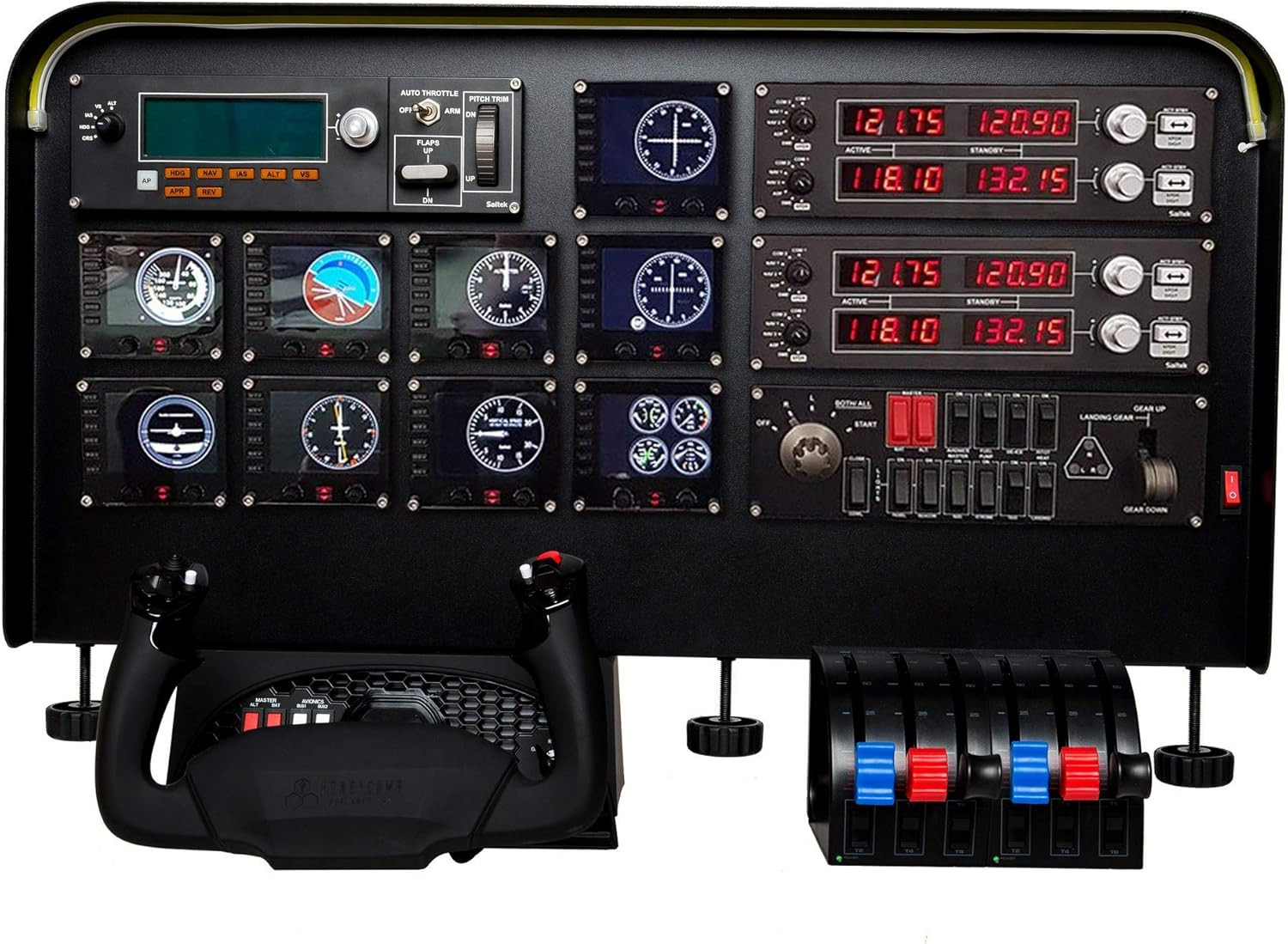
Choosing flight sim panels & instruments is less about adding the most hardware and more about finding a panel that fits your existing yoke, switch gear, and available space. The Complete Flight Simulator Cockpit is designed for PC setups built around Logitech, Saitek, or Honeycomb equipment, but its broad cockpit format may not suit every desk or hardware combination.
Quick verdict
At USD 255.86, this cockpit panel makes the most sense for a PC flight-sim setup that already uses compatible Logitech, Saitek, or Honeycomb equipment. Its pre-cut instrument positions and adjustable light bar give the build a more organized cockpit feel without requiring the user to cut the panel by hand.
The main trade-off is compatibility scope: the stated fit focuses on Honeycomb Alpha, Logitech, and Saitek flight yokes, along with select Logitech and Saitek switch and throttle panels. Shoppers outside that hardware group have less clearly defined support from the listed details.
Complete Flight Simulator Cockpit - Compatible with Logitech Saitek Honeycomb
The clearest reason to choose this cockpit is the pre-cut layout. Positions for instruments are prepared in the panel, and the description says they can be pressed through by hand before configuring the setup. That makes the physical arrangement a central part of the product rather than an afterthought.
A second practical feature is the light bar, whose brightness can be adjusted with a knob. The panel is also described as fitting flight sim instruments such as radios and speed indicators, giving it a role beyond simply holding a yoke. Its black finish and listed dimensions of 30.3 x 4 x 15.8 inches define the look and footprint of the setup.
Who it suits
This is a sensible match for a PC simmer building around a Honeycomb Alpha, Logitech, or Saitek yoke. It is also worth considering when the goal is to bring compatible switch and throttle panels into a more unified cockpit layout. The pre-cut positions are particularly relevant if you want a structured arrangement for radios or speed indicators.
The limitation is that the compatibility language names specific equipment families rather than describing a universal flight simulator panel. The listed hardware platform is PC, so the fit is most clearly defined for that environment.
Meaningful trade-offs
The size is important before committing desk or cockpit space: a panel measuring 30.3 inches wide has a substantial horizontal footprint. The description emphasizes quick setup and hand-pressed cutouts, but the layout still depends on the instruments and compatible gear you plan to configure around it.
The adjustable light bar is useful for controlling the panel's illumination, while the overall design prioritizes a fixed cockpit presentation. That combination favors a dedicated home cockpit arrangement over a minimal, easily moved control setup.
Bottom line
Choose the Complete Flight Simulator Cockpit if you want a pre-cut PC panel centered on Logitech, Saitek, or Honeycomb gear and you have room for its 30.3-inch width. At USD 255.86, its strongest case is the combination of prepared instrument positions, adjustable lighting, and named compatibility. Its weaker fit is for shoppers whose hardware falls outside those stated equipment families or who need a smaller panel footprint.