Choosing between sim racing steering wheels & bases is less about chasing a generic winner and more about matching the control layout to your setup. Innato GT3 Yellow and Innato 488 GTE Elite are both 300mm PC wheels with 70mm bolt patterns, and each requires a compatible adapter for the intended base. The useful split is straightforward: GT3 Yellow emphasizes a 33-input arrangement at a lower listed price, while 488 GTE Elite uses 11 pushbuttons within a 26-input arrangement.
Quick verdict
Choose Innato GT3 Yellow if 33 total inputs, 3 rotary encoders, and 2 funky switches fit your preferred interface. Choose Innato 488 GTE Elite if 11 pushbuttons are the priority, while its listed layout uses 2 rotary encoders, 1 funky switch, and 26 total inputs. Neither control count establishes a universal performance winner; the better match depends on which controls you want at hand.
Compact comparison
| Wheel | Listed price | Control layout | Shared setup details |
|---|---|---|---|
| Innato GT3 Yellow | USD 219.00 | 8 pushbuttons, 3 rotary encoders, 2 funky switches, 33 total inputs | PC; 70mm bolt pattern; compatible adapter required for each base |
| Innato 488 GTE Elite | USD 299.00 | 11 pushbuttons, 2 rotary encoders, 1 funky switch, 26 total inputs | PC; 70mm bolt pattern; compatible adapter required for each base |
Where each wheel wins
Where Innato GT3 Yellow wins
GT3 Yellow wins on listed price and offers the higher total-input count as a raw specification. Its control mix also favors shoppers who specifically want 3 rotary encoders and 2 funky switches rather than the 488 GTE Elite arrangement. The listed price difference is $80, making GT3 Yellow the more straightforward choice when keeping the purchase below the other wheel's price matters.
Where Innato 488 GTE Elite wins
488 GTE Elite wins for shoppers who place 11 pushbuttons ahead of the GT3 Yellow's 8. That is the clearest reason to choose it: the layout gives more pushbuttons while using fewer rotary encoders and one funky switch. Its title also identifies a distinct 488 GTE Elite design, so the choice can come down to the named wheel format and button arrangement rather than a claim that one steering wheel is universally superior.
Product notes
Innato GT3 Yellow
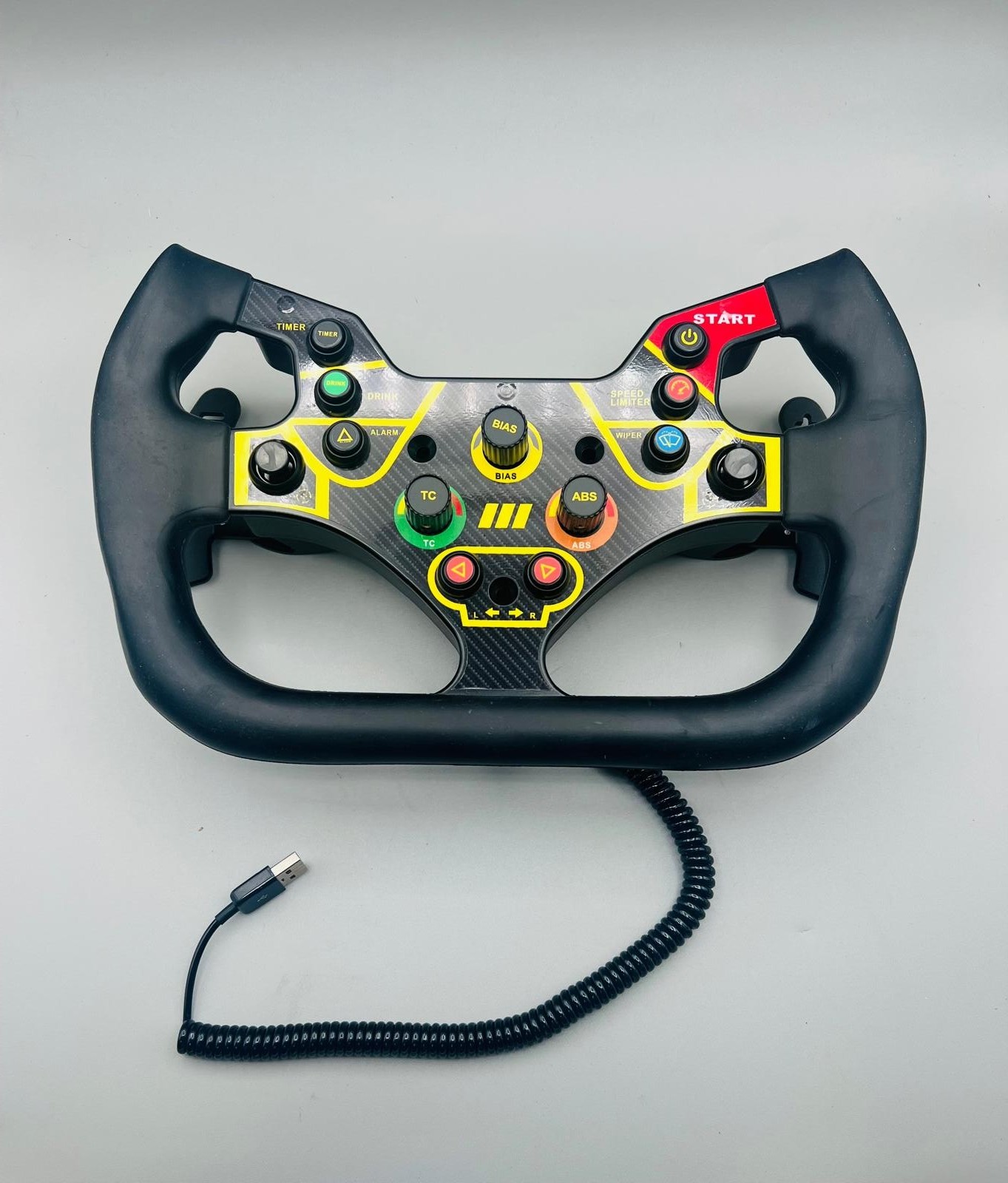
The Innato GT3 Yellow is the natural fit for a shopper who wants its specific control combination: 3 CTS 288 rotary encoders with pushbuttons, 2 funky switches, and 33 total inputs. That arrangement is a concrete reason to choose it when those control types match your preferred interface. The wheel is also described with a three-part build using anodized aluminum at the front and rear, an ABS center, and polyurethane resin grips. Its limitation is the 8-pushbutton count, so anyone specifically prioritizing 11 pushbuttons should choose Innato 488 GTE Elite instead. GT3 Yellow is best understood as the layout-led choice, not automatically the superior wheel because it lists more total inputs.
Innato 488 GTE Elite
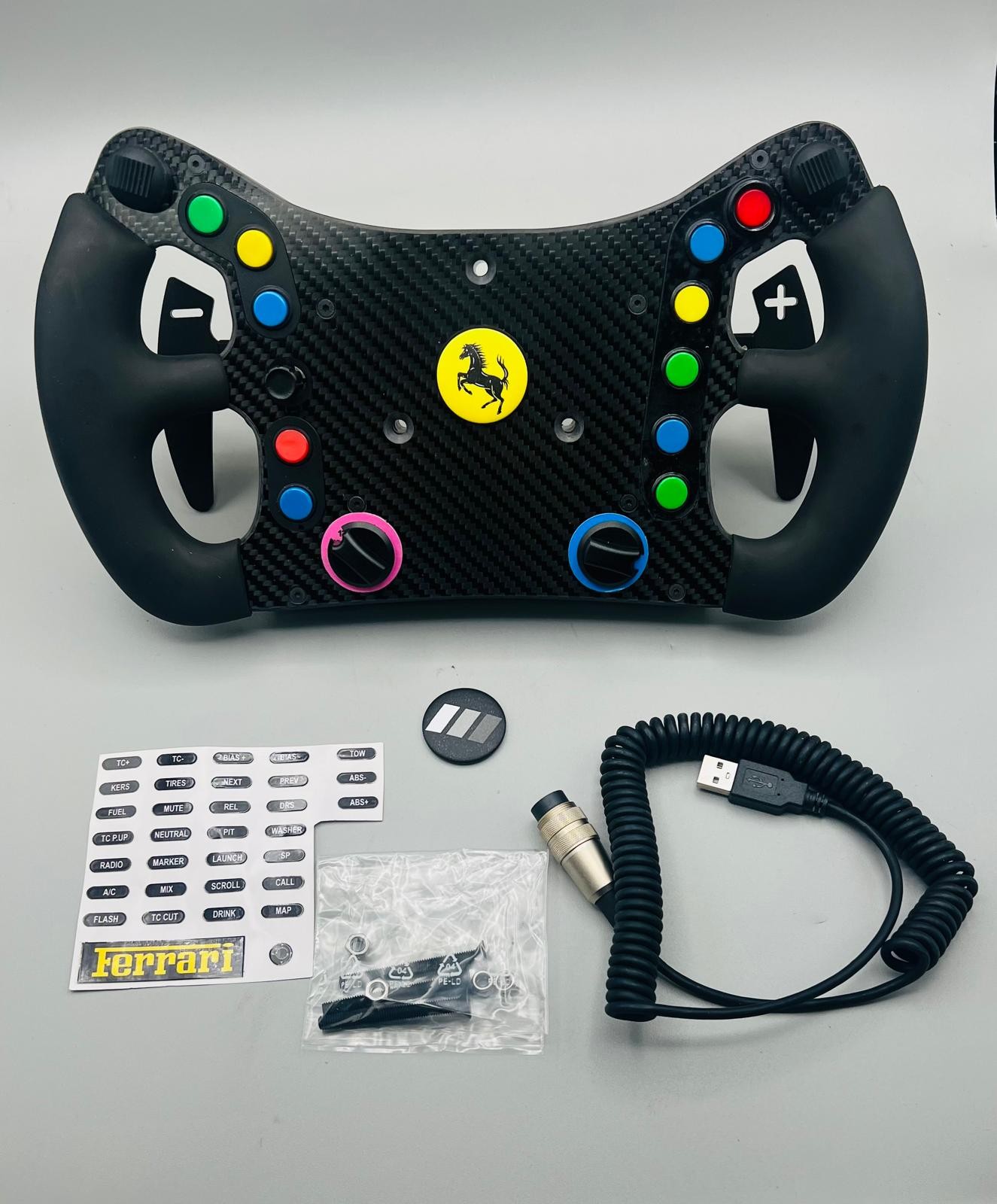
Innato 488 GTE Elite suits shoppers who would rather have 11 high-precision pushbuttons than GT3 Yellow's 8. Its remaining control layout lists 2 CTS 288 rotary encoders with pushbuttons, 1 funky switch, and 26 total inputs, giving it a clearly different arrangement to consider. The concrete reason to choose it is therefore button emphasis, especially if that count matters more than the number of encoders or total inputs. The limitation is the higher listed price and the lower 26-input total compared with GT3 Yellow. The shared PC use and adapter requirement mean the deciding detail here is the control layout, not an assumed difference in compatibility.
Final choice by use case
- Choose Innato GT3 Yellow for lower spend: At USD 219.00, it is $80 below Innato 488 GTE Elite's USD 299.00 price and lists 33 total inputs.
- Choose Innato 488 GTE Elite for pushbutton-focused control: Its 11 pushbuttons are the decisive listed difference if that arrangement is your priority.
- Choose by control mix: GT3 Yellow lists 3 encoders and 2 funky switches; 488 GTE Elite lists 2 encoders and 1 funky switch. Pick the layout that matches how you want to assign controls.
